
IPTV Setup on Android TV & Android Boxes
Android is the most flexible platform for IPTV. Almost every player supports it, installs come straight from Google Play, and no sideloading is needed on most boxes.
Step-by-step setup
- Open Google Play. On your Android TV box, phone or tablet, open the Play Store.
- Install your player. Search for IBO Player Pro and install it. IPTV Smarters Pro and XCIPTV are also available if you prefer them.
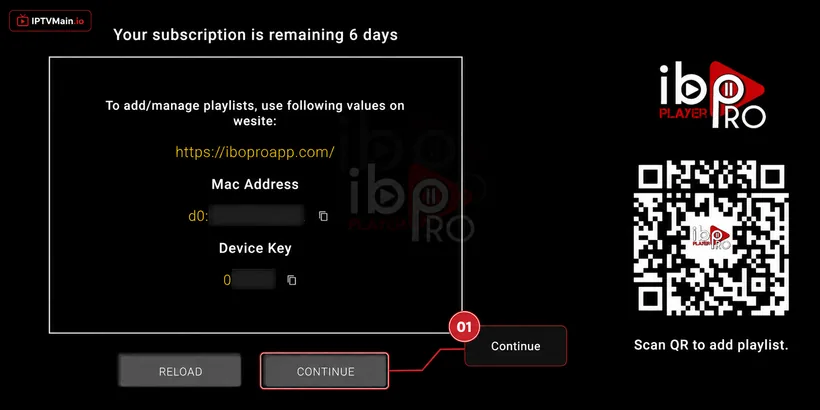
- Note your device details. Open the app and note the MAC Address and Device Key shown on the first screen.
- Get activated. Send both values to us on live chat, WhatsApp or email for remote activation.
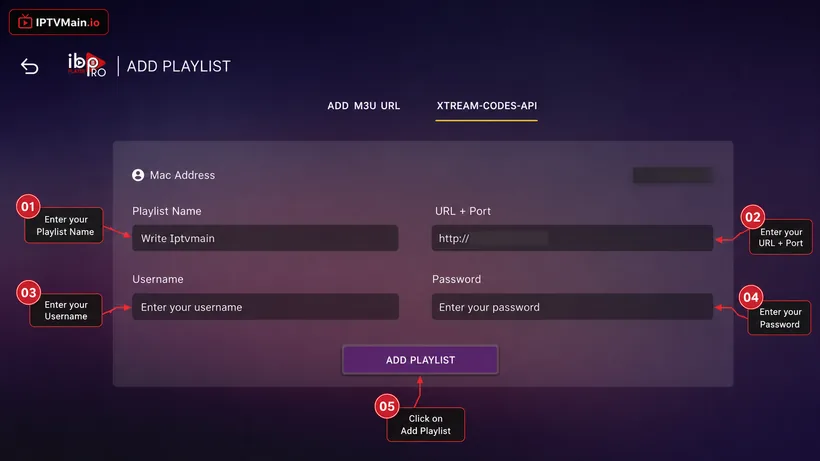
- Add the playlist. Enter the Xtream Codes server URL, username and password from your welcome email.
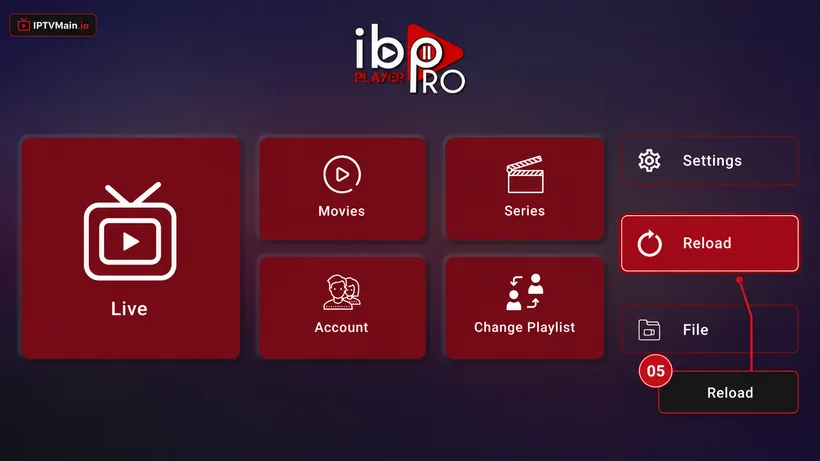
- Reload. Reload the app and your full lineup loads.
Stuck at any point? Message us on email or live chat — we answer 24/7.
Activate & add your playlist
Once the app is installed on your Android TV, these five screens get you streaming.
- Note your MAC & Device Key. A popup shows your MAC Address and Device Key. Click Continue, then send us both on live chat, WhatsApp or email (contact@iptvmain.io) so we can activate your line.
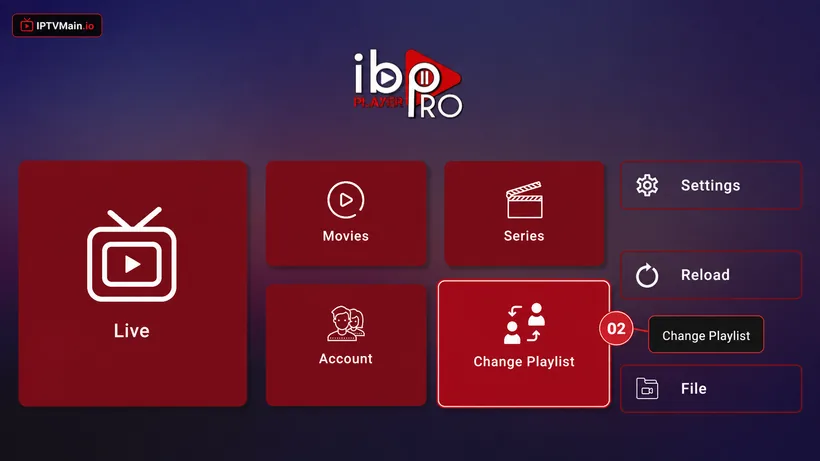
- Change Playlist. Once we confirm activation, open the app home page and choose Change Playlist.
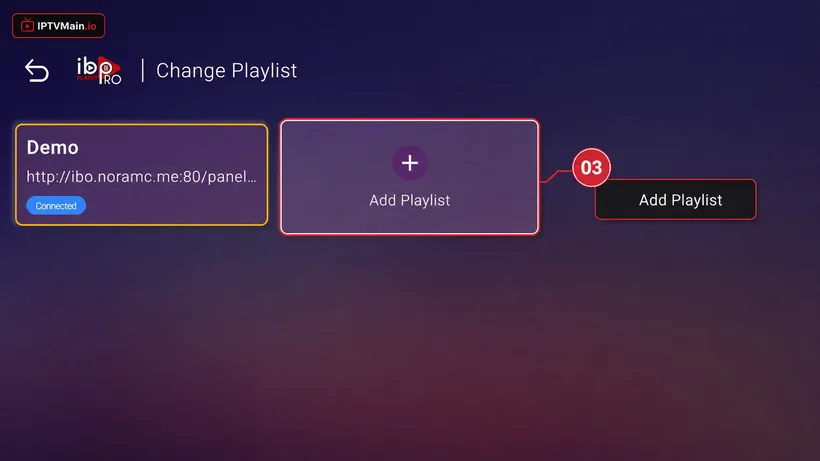
- Add Playlist. Select Add Playlist.
- Enter your login details. Choose the Xtream-Codes-API tab and fill in the server URL, username and password from your welcome email — check spam if you cannot find it.
- Reload and watch. Make sure the playlist is connected on the home page, then press Reload. Your channels, VOD and guide load in.
Android TV problems & fixes
Which Android player is best?
IBO Player Pro if you want us to handle activation, IPTV Smarters Pro for a free option, XCIPTV for multi-screen. All three work with your line.
Channels load but will not play
Switch the playback engine in the app settings to VLC or MX Player. This resolves a large share of Android playback complaints.
Do I need a powerful box?
For 4K, look for at least 2 GB RAM and proper HEVC support. Very cheap boxes struggle with high-bitrate sport.
Set up another device
Firestick
Install IPTV on an Amazon Firestick step by step: enable unknown apps, sideload IBO Player Pro with Downloader, and activate your IPTVMain line in about ten minutes.
SetupSamsung TV
Set up IPTV directly on a Samsung Smart TV running Tizen — no Firestick or Android box needed. Install from the Samsung store and activate in minutes.
SetupLG TV
Install IPTV on an LG Smart TV running webOS using the LG Content Store — step-by-step setup, activation and the webOS-specific issues to watch for.
SetupiPhone & iPad
Watch IPTV on iPhone and iPad — install a player from the App Store, activate your line, and use AirPlay to send it to a TV.
SetupWindows & Mac
Watch IPTV on a Windows PC or Mac — install a desktop player, enter your Xtream Codes or M3U details, and stream in full quality on a big monitor.
SetupFormuler Z
Add your IPTV line to a Formuler Z box using MYTVOnline — Xtream Codes, M3U and MAC portal setup for Z8, Z10, Z11 and Z Alpha.
Ready to start streaming?
Test the service on your Android TV free for 24 hours before you commit.