
IPTV Setup on LG Smart TV
LG Smart TVs run webOS and install IPTV players from the LG Content Store. The flow mirrors Samsung, with a couple of webOS quirks worth knowing before you start.
Step-by-step setup
- Open the LG Content Store. Press Home on the LG remote and open the LG Content Store.
- Find the player. Search for IBO Player Pro and install the official app.
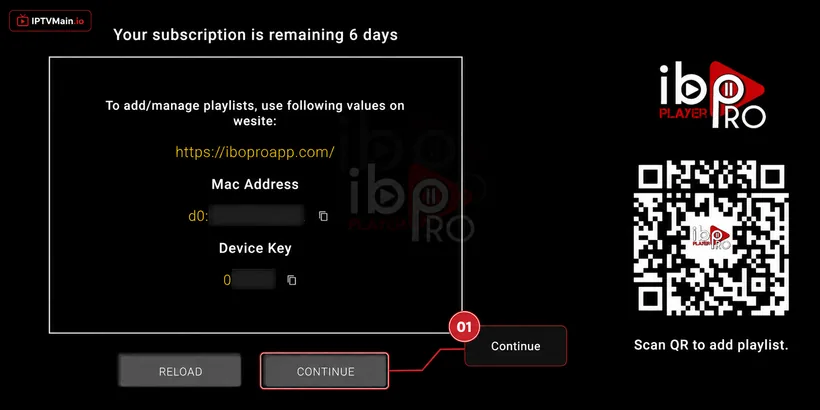
- Note your MAC and Device Key. Launch the app — both values appear on the first screen.
- Send them for activation. Pass both to our support team on live chat, WhatsApp or email.
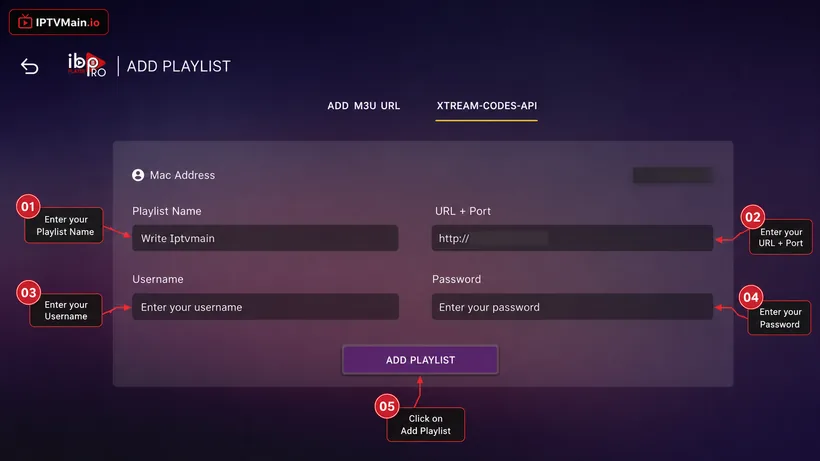
- Enter your playlist. Use Change Playlist, then Add Playlist, and enter your Xtream Codes login from the welcome email.
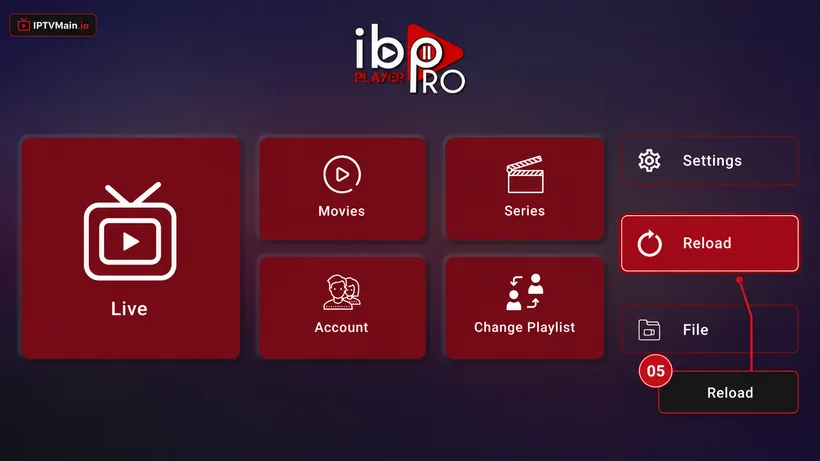
- Reload and watch. Go back to the home screen and hit Reload to pull in channels, VOD and the guide.
Stuck at any point? Message us on email or live chat — we answer 24/7.
Activate & add your playlist
Once the app is installed on your LG TV, these five screens get you streaming.
- Note your MAC & Device Key. A popup shows your MAC Address and Device Key. Click Continue, then send us both on live chat, WhatsApp or email (contact@iptvmain.io) so we can activate your line.
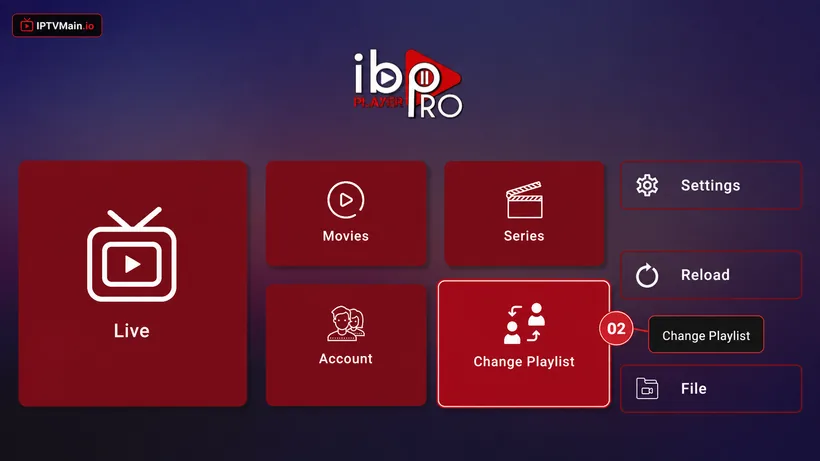
- Change Playlist. Once we confirm activation, open the app home page and choose Change Playlist.
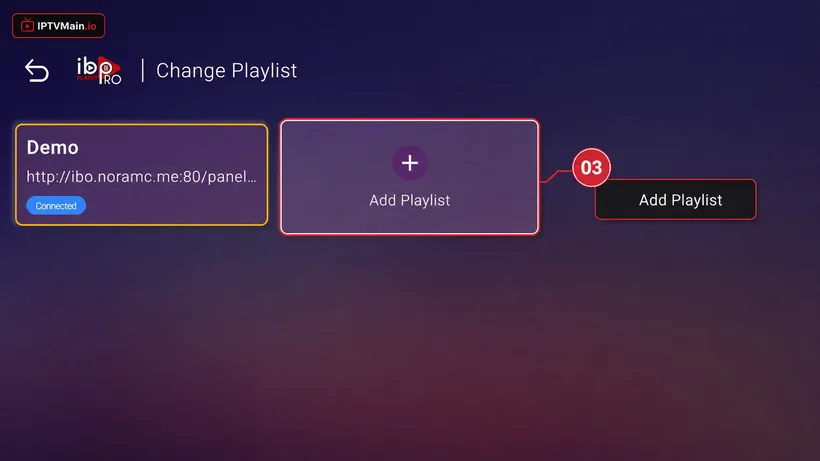
- Add Playlist. Select Add Playlist.
- Enter your login details. Choose the Xtream-Codes-API tab and fill in the server URL, username and password from your welcome email — check spam if you cannot find it.
- Reload and watch. Make sure the playlist is connected on the home page, then press Reload. Your channels, VOD and guide load in.
LG TV problems & fixes
The app closes when I open it
On webOS this usually means a stale cache. Fully close the app from the recent-apps bar and reopen. If it persists, uninstall and reinstall from the Content Store.
Nothing appears after adding my playlist
Check the server URL was entered exactly as sent, including the port number. A missing port is the most common cause on LG sets.
My LG TV is quite old
Pre-2018 webOS versions often cannot run modern IPTV players. A Firestick in a spare HDMI port is faster than forcing it.
Set up another device
Firestick
Install IPTV on an Amazon Firestick step by step: enable unknown apps, sideload IBO Player Pro with Downloader, and activate your IPTVMain line in about ten minutes.
SetupSamsung TV
Set up IPTV directly on a Samsung Smart TV running Tizen — no Firestick or Android box needed. Install from the Samsung store and activate in minutes.
SetupAndroid TV
Set up IPTV on Android TV boxes, phones and tablets — install from Google Play, activate your line, and pick the right player for your device.
SetupiPhone & iPad
Watch IPTV on iPhone and iPad — install a player from the App Store, activate your line, and use AirPlay to send it to a TV.
SetupWindows & Mac
Watch IPTV on a Windows PC or Mac — install a desktop player, enter your Xtream Codes or M3U details, and stream in full quality on a big monitor.
SetupFormuler Z
Add your IPTV line to a Formuler Z box using MYTVOnline — Xtream Codes, M3U and MAC portal setup for Z8, Z10, Z11 and Z Alpha.
Ready to start streaming?
Test the service on your LG TV free for 24 hours before you commit.